

You missed another call while you were under a sink in Newington or finishing a cut in West Hartford. That caller did not leave a voicemail — they called the next name on the list. An AI receptionist for small business promises to fix that. Some of them do. Some of them frustrate your customers and cost you more than the missed calls did.
This article tells you exactly what these tools handle well, where they break down, and how to run a low-risk test before you commit to anything.
What an AI Phone Answering Service Actually Does
The term covers a wide range of products. At the basic end, you get a voice bot that reads a script and routes calls. At the better end, you get a system that answers in natural language, books appointments into your calendar, answers common questions, and sends a summary to your inbox after every call.
The core jobs it can do reliably
- Answer every call on the first or second ring, 24 hours a day
- Collect a caller’s name, number, and reason for calling
- Book or reschedule appointments if it connects to your calendar (Google Calendar, Calendly, and similar tools)
- Answer FAQ-style questions: hours, service area, pricing ranges, parking, accepted insurance
- Send you a text or email summary of every call within seconds
- Screen out spam and robocalls before they reach you
What it cannot do reliably
- Handle an angry customer who wants to speak to a person immediately
- Diagnose a complex problem (“my boiler is making a banging noise and the pressure gauge is in the red”)
- Negotiate, make exceptions to policy, or use judgment
- Build the kind of rapport that turns a first-time caller into a loyal customer
If most of your calls are appointment requests, quote inquiries, and “are you open Saturday” questions, an AI answering service will handle the majority of your volume without a human in the loop. If most of your calls require judgment or relationship, it will not.
The Named Tradeoff: AI Answering vs. Human Virtual Receptionist
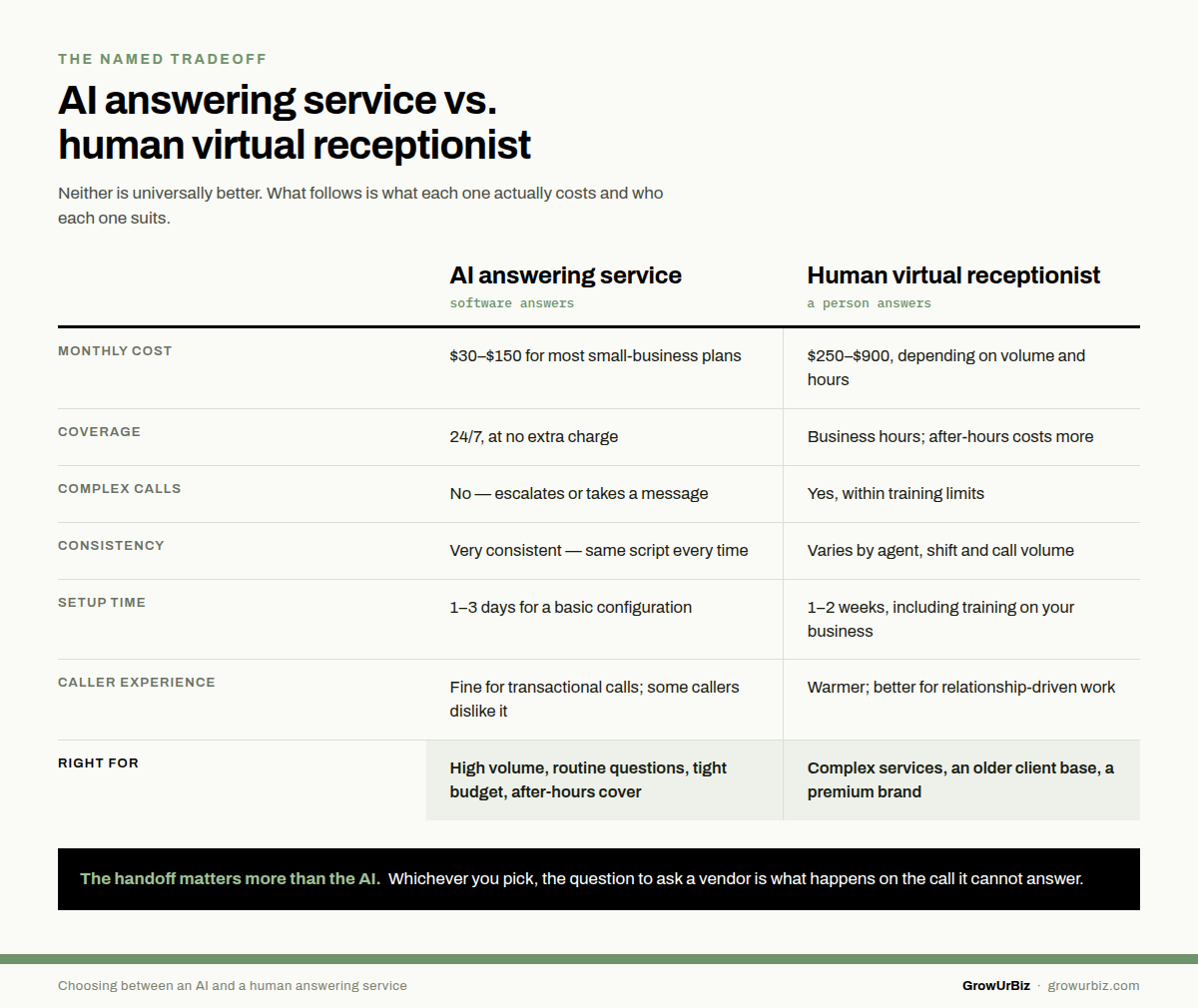
You have two real options here. Neither is universally better. Here is what each one actually costs and who each one suits.
| AI Answering Service | Human Virtual Receptionist | |
|---|---|---|
| Typical monthly cost | $30–$150/month for most small-business plans | $250–$900/month depending on call volume and hours |
| Hours of coverage | 24/7 at no extra charge | Usually business hours; after-hours costs more |
| Handles complex calls | No — escalates or takes a message | Yes, within training limits |
| Consistent performance | Very consistent — same script every time | Varies by agent, shift, and call volume |
| Setup time | 1–3 days for a basic configuration | 1–2 weeks including training on your business |
| Caller experience | Acceptable for transactional calls; some callers dislike it | Warmer; better for relationship-driven businesses |
| Right for | High call volume, routine inquiries, tight budget, after-hours coverage | Complex service businesses, older client base, premium brand positioning |
Who should choose AI: A plumber in Enfield taking 30 calls a week, most of them booking requests and price questions. The AI handles the routine load; he calls back the complex ones from the job site.
Who should choose human: An estate planning attorney in Glastonbury whose callers are often anxious, sometimes grieving, and always forming a first impression. A bot that mispronounces a name or misses an emotional cue can cost a client worth thousands of dollars.
There is no wrong answer. There is only the wrong tool for your specific caller.
For what each tier actually costs, see how much an AI receptionist costs for a small business.
How the Handoff Works — and Why It Matters More Than the AI Itself
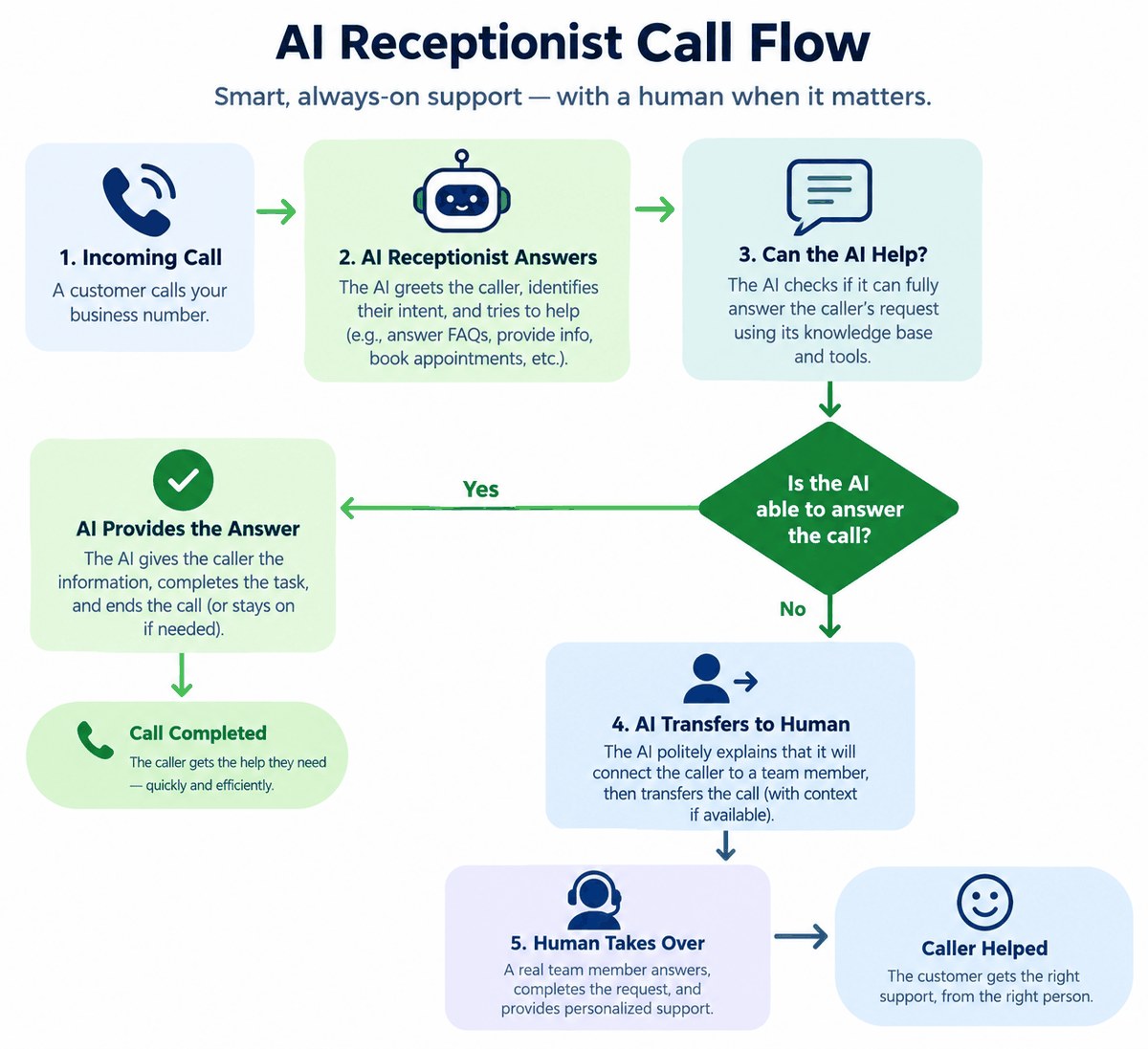
The handoff is the moment the AI decides it cannot help and transfers the caller to a human or takes a message. This is where most bad experiences happen. A clumsy handoff — long hold music, a repeated request for the caller’s name, a dropped call — undoes everything the AI did right.
What a good handoff looks like
The AI says something like: “I want to make sure you get the right help. Let me take your name and number and have [Owner Name] call you back within the hour.” It does not say “I am just an AI” in a way that makes the caller feel like they wasted their time. It confirms the callback time, sends you the summary immediately, and gets out of the way.
Questions to ask any provider before you sign up
- What triggers a handoff — specific keywords, caller frustration, request for a human?
- Can I set a maximum time before the AI escalates?
- What does the caller hear during the transfer?
- Do I get a transcript or just a summary?
- Can I listen to call recordings?
If a provider cannot answer those questions clearly, that is your answer.
Setting Up an AI Receptionist: What You Actually Need to Prepare
The technology is the easy part. The setup fails when the business owner cannot tell the system what to say. Before you configure anything, write down the answers to these questions in plain English:
Your setup checklist
- Your service area: List every town you serve. For a contractor covering Bristol, Southington, and Plainville, say so explicitly — the AI should tell callers from outside your area before they waste time.
- Your top five FAQ answers: Hours, pricing range or “free estimate,” how to book, what you do not do, and how fast you respond.
- Your booking rules: Which calendar does it connect to? What appointment types exist? How long is each one?
- Your escalation rule: What words or situations should always go straight to you — “emergency,” “no heat,” “flooding,” a caller who says they are a current customer with a problem?
- Your callback promise: What time window will you commit to? “Within two hours during business hours” is believable. “Immediately” is not.
AI answering pilot
We set up a test configuration for your business, run it for two weeks on real calls, and show you exactly what it handled and what it missed — so you can decide with real data, not a sales pitch. Book it here. Honest feedback, zero pressure.
What It Costs and What to Watch Out For
Most AI phone answering tools for small businesses price on one of three models: flat monthly fee, per-minute, or per-call. Here is what those mean in practice:
Pricing models explained
- Flat monthly ($30–$150): Predictable. Good if your call volume is consistent. Watch for caps — some plans limit you to 100 calls or 200 minutes per month.
- Per-minute ($0.10–$0.35/minute): Fine if your calls are short. A 3-minute call costs $0.30–$1.05. Fifty calls a month at 3 minutes each runs $15–$52. Cheap — until you have a busy season.
- Per-call ($1–$3/call): Easy to forecast. Fifty calls a month costs $50–$150. Make sure “call” means a completed interaction, not a ring that goes to voicemail.
Before you pay for anything, spend one week logging your missed calls manually. Count them. Multiply by your average job value. That number tells you whether this tool pays for itself — or whether you do not actually have a volume problem worth solving yet.
When to Add AI Chat Alongside the Phone Answering
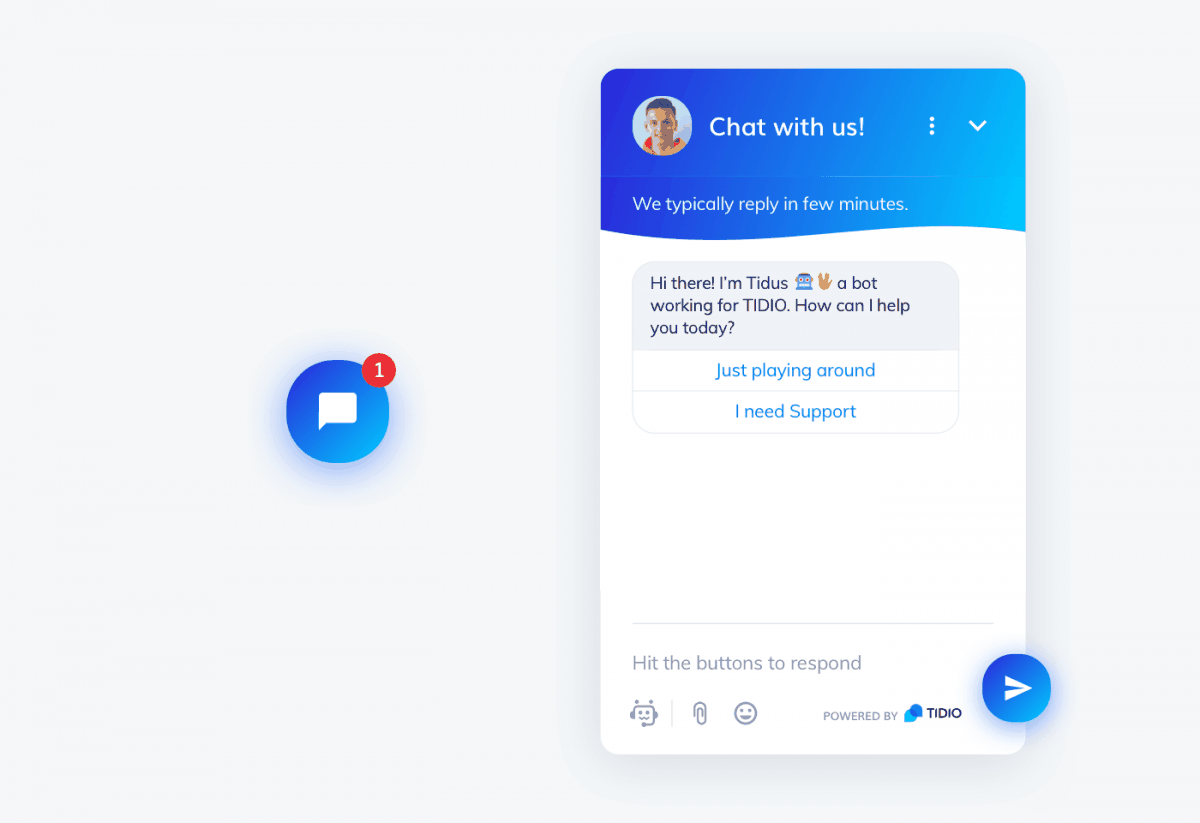
Some of your potential customers will not call. They will find you at 10 p.m. on a Tuesday, read your website for four minutes, and then leave because no one answered their question. An AI phone answering service does nothing for that visitor.
The simple rule
If you are getting website traffic but not getting contact form submissions, add AI chat to your site. If you are getting calls but missing them, start with the AI phone answering service. Do not buy both at once. Fix the bigger leak first, measure it for 30 days, then decide whether the second one is worth it.
For most service businesses in Manchester, Newington, or Bristol — where customers are still more likely to call than to chat — the phone comes first.
Frequently Asked Questions
Will callers know they are talking to an AI?
Some will. Some will not. The better systems sound natural enough that callers focus on whether their question got answered, not on who answered it. The ones that sound robotic will frustrate callers. Listen to demo calls before you choose a provider. If the demo sounds bad to you, it will sound bad to your customers.
Can an AI receptionist book appointments directly into my calendar?
Yes, if the platform integrates with your calendar tool. Google Calendar, Calendly, and several practice-management and field-service platforms are commonly supported. Ask the provider for a specific list of integrations before you sign up. If your booking system is not on the list, the AI can take a message but cannot book — which is still useful, just not the same thing.
What happens if the AI gets a question wrong?
It depends on how the system is configured. A well-set-up system will say “I am not sure about that — let me have someone call you back” rather than guessing. A poorly configured one will guess and get it wrong. This is why your FAQ answers need to be in the system before it goes live, and why you should listen to the first week of calls to catch errors early.
Is an AI answering service HIPAA-compliant?
Some are, some are not. If you are a healthcare provider, therapist, or any business that handles protected health information, you need a provider that will sign a Business Associate Agreement (BAA). Ask for it explicitly. Do not assume compliance — ask for the signed document.
How long does it take to set up?
A basic configuration — greeting, FAQ answers, message-taking, and a callback rule — takes one to three business days with most platforms. A more complex setup with calendar booking and multiple call flows can take a week. Either way, you can run it on a forwarded number alongside your existing line while you test it, so there is no disruption to your current calls.
What if my callers are older and do not like talking to bots?
This is a real concern and it is worth taking seriously. If your client base skews older — common in estate services, certain medical practices, and some home-care businesses — a human virtual receptionist may hold your reputation better than an AI, even if it costs more. Test it on a secondary line with a small sample before you roll it out to your main number. If you hear complaints in the first two weeks, that is your answer.
Your Next Step
If you are losing calls today, the fastest thing you can do is forward your phone to a basic AI answering service for two weeks and see what it catches. You do not need a long-term contract to find out. Most platforms offer a free trial or a month-to-month option. Run it, listen to the recordings, count the bookings it generated, and then decide whether to keep it, upgrade it, or replace it with a human service.
If you want help setting up a configuration that is specific to your business — your service area, your call types, your escalation rules — that is exactly what the pilot above is for. Call us at (860) 730-1636 or book online.