

Your Google Business Profile is probably showing customers wrong information right now, and you don’t know it. This checklist walks you through every field that matters — in order — so you can find and fix problems before they cost you a phone call.
This is the same review we run during a Free Local Marketing Checkup. You can do it yourself in about ten minutes. Open your profile at business.google.com and follow along.
Why Your GBP Listing Deserves Ten Minutes Right Now
The problem with “set it and forget it”
Google sometimes edits your profile automatically based on data it pulls from other websites. A third-party site might list your old address or wrong hours, Google absorbs that data, and your profile changes without any notification to you. This happens to real businesses in West Hartford and Manchester more than most owners realize.
A quick monthly check catches these changes before a customer shows up at the wrong address or calls a disconnected number.
What this checklist covers
We go through eight areas: business name, categories, address and service area, hours, phone and website, description, photos, and reviews. Each section tells you exactly what to look at and what a problem looks like.
For the reasoning behind which of these fields Google actually reads, see our guide to Google My Business SEO.
Step 1 — Business Name, Categories, and Attributes
Business name
Your name in Google should match the name on your storefront, your invoices, and your website exactly. Do not add keywords like “Best Plumber Hartford” to your business name field. Google’s guidelines prohibit it, and if a competitor reports you, your listing can be suspended.
Check: Does the name match everywhere? If not, edit it to match your legal or trade name only.
Primary and secondary categories
Your primary category is the single most important ranking signal in your profile. It tells Google what kind of searches to show you for.
Check: Is your primary category the most specific match for your core service? A plumber should be “Plumber,” not “Contractor.” A family dentist in Glastonbury should be “Dentist,” not “Medical Clinic.”
You can add secondary categories for additional services. A plumber who also does water heater installation can add “Water Heater Contractor” as a secondary category. Add every category that honestly applies — do not add categories for services you don’t offer.
Attributes
Attributes are the small checkboxes that describe your business: wheelchair accessible, women-owned, accepts credit cards, outdoor seating, and so on. They appear in your profile and influence filtered searches.
Check: Are your attributes turned on? Many owners never touch this section. Spend two minutes clicking through and marking what applies.
Step 2 — Address, Service Area, and Map Pin
Physical address
If customers come to your location, confirm the address is correct down to suite number. If you serve customers at their location and you hide your address (common for contractors and mobile services), confirm the address is hidden and your service area is set instead.
Service area
Service-area businesses can list up to 20 areas. Use specific towns rather than “Hartford County” as a single entry. List the towns where you actually take jobs: Enfield, Windsor, Bloomfield, Newington, Bristol — whatever matches your real service footprint.
Check: Are your listed service areas the towns you actually want calls from? Remove any you added optimistically but never actually serve.
Map pin placement
Look at where your pin sits on the map. If it is dropped in the wrong parking lot or on the wrong street, customers using navigation will go to the wrong place.
Check: Does the pin land on your actual building? If not, drag it to the correct spot.
Step 3 — Hours, Special Hours, and Holiday Hours
Regular hours
Wrong hours are one of the most common problems we find. A customer checks your hours at 7 p.m., sees you’re open until 8, drives over, and finds a locked door. That customer does not come back.
Check: Are your hours accurate for every day of the week, including days you are closed?
Special and holiday hours
Google prompts you to set holiday hours around major holidays. If you skip this, Google may mark your listing as “hours not confirmed” or display a warning to searchers.
Check: Are any upcoming holidays covered? Set them now if not. This takes under two minutes.
Step 4 — Phone Number and Website URL
Phone number
This should be a number you answer, not a tracking number from a third-party service you stopped using two years ago.
Check: Call the number listed. Does it ring your business? If you use a tracking number, confirm it is still active and forwarding correctly.
If you have questions, call us: (860) 730-1636.
Website URL
Click the website link in your own profile. Does it go to your homepage, or does it 404? Does it load on a phone in under three seconds?
Check: Click the link. If it is broken or slow, fix the URL or flag it for your web person today.
Step 5 — Business Description
What belongs in the description
You have 750 characters. Use them to describe what you do, who you serve, and what makes you worth calling. Write it the way you would explain your business to a neighbor.
Do not stuff keywords in a list. Do not copy your website’s about page word for word. Write one or two plain paragraphs.
What to check
Check: Is your description filled in at all? Many profiles leave this blank. Does it mention the towns or area you serve? Does it describe a real benefit to the customer, not just your credentials?
A Newington HVAC company might write: “We install and service heating and cooling systems for homeowners across central Connecticut. Family-owned since 1998. Same-day service available for emergencies.”
That is enough. It is honest, specific, and readable.
Step 6 — Photos
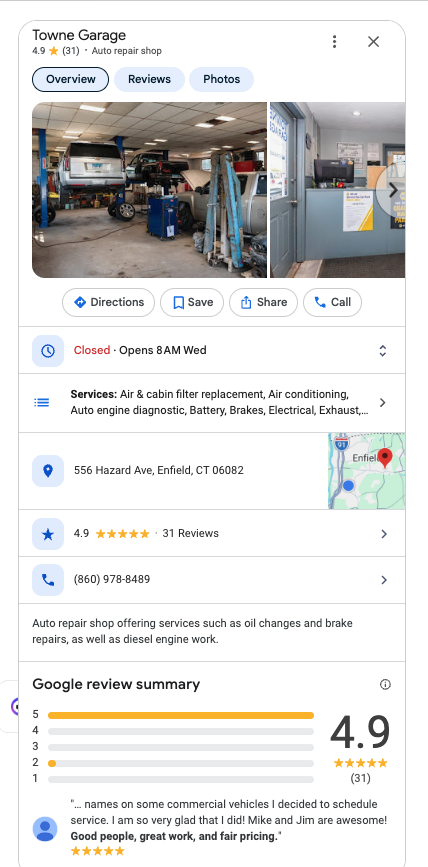
The Trust Move: Here Is Exactly What We Look At
When we run a profile audit, photos are one of the first things we check — not because they are the most important ranking factor, but because they are the fastest signal of whether a business is active and real. Here is the exact sequence we follow, field by field.
Cover photo: Is it a clear image of your storefront, team, or work? Not a stock photo, not a blurry phone shot from 2016. This is the first image most customers see.
Logo: Is your logo uploaded? It appears as your profile icon in search results. A missing logo makes your listing look incomplete next to competitors who have one.
Interior and exterior photos: For any business with a physical location — a salon in Bristol, a restaurant in Manchester, a retail shop in Glastonbury — interior and exterior photos help customers recognize you when they arrive and feel comfortable before they walk in.
Work or product photos: Contractors: post photos of completed jobs. Retail: post photos of your products. Health and wellness: post photos of your space. These are the photos that convert browsers into callers.
Photo count and recency: Look at the date on your most recent photo. If it was uploaded more than six months ago, add something new today. A profile with recent photo activity signals to Google that the business is active.
Customer photos: Google lets customers add their own photos to your listing. Scroll through them. If any are inaccurate or inappropriate, you can flag them for removal through the profile interface.
Check: Do you have a cover photo, a logo, and at least three photos of your actual work or space? If not, add them before you do anything else on this list.
Free Local Marketing Checkup
We look at your Google Business Profile, your top local competitors, and the gaps that are costing you calls — then tell you exactly what to fix first. Takes about 20 minutes. Book it here. Honest feedback, zero pressure.
Step 7 — Reviews
Your current review snapshot
Look at three numbers: your total review count, your average star rating, and the date of your most recent review.
Check: When did your last review come in? If it was more than 60 days ago, you need a system for asking. A profile with 40 reviews and the most recent one from eight months ago looks stale to a customer deciding between you and a competitor with a review from last week.
Responding to reviews
Respond to every review — positive and negative. For positive reviews, a short, genuine thank-you is enough. For negative reviews, respond calmly, acknowledge the concern, and offer to make it right offline. Do not argue in public.
Check: Do you have any unanswered reviews, positive or negative? Answer them today.
A simple ask that works
The most effective way to get more reviews is to ask right after the job is done, while the customer is happy. A text message works well: “Hi [Name], thanks for choosing us. If you have a minute, a Google review helps our small business a lot — here’s the link: [your review link].” That is it. No incentive, no pressure — just a direct ask at the right moment.
Comparison: Doing This Yourself vs. Hiring Someone
| Option | Real advantage | Real cost | Right for |
|---|---|---|---|
| DIY with this checklist | Free. You learn your own profile. You can catch changes as they happen. | Your time — about 10 minutes now, 5 minutes monthly to maintain. | Owners who have time to check monthly and want full control. |
| Hiring a local SEO service | Someone else monitors and updates it. Can include broader local SEO work beyond GBP. | Typically $200–$600 per month for a reputable local SEO provider, more for agencies. Results take 3–6 months to show clearly. | Owners who are too busy to maintain it themselves and have a marketing budget to sustain the spend. |
Neither option is wrong. If your profile has serious gaps and you have no time, paid help makes sense. If your profile just needs a tune-up and you can spend ten minutes a month, do it yourself first.
Frequently Asked Questions
How often should I run through this checklist?
Once a month is enough for most businesses. Set a reminder for the first Monday of the month. The full check takes about five minutes once you have done it the first time.
Can Google change my profile without my permission?
Yes. Google can accept suggested edits from users or pull data from third-party sources and apply changes to your profile. You will not always get a notification. This is why a monthly check matters — you are looking for changes you did not make.
What is the difference between a Google Business Profile and Google Maps?
They are connected. Your Google Business Profile is the account you manage. Google Maps is one of the places where your profile appears to the public. Changes you make in your profile show up in Maps, Google Search, and other Google surfaces.
My rating dropped. What should I do?
First, read the new reviews to understand what happened. Respond to each one calmly. Then focus on generating fresh positive reviews from recent happy customers to bring the average back up over time. Do not pay for fake reviews — Google removes them and can suspend your listing.
Do I need a website to have a Google Business Profile?
No. You can have an active, effective profile without a website. That said, a website gives Google more information to confirm your business is legitimate, and it gives customers a place to learn more before they call. If you have no website, your profile needs to be especially complete.
Is this checklist the same thing as a full local SEO audit?
No. This checklist covers your Google Business Profile only. A full local SEO audit also looks at your website, your citations on other directories, your backlinks, and how you compare to competitors in search results. That wider sweep is what our Google Business Profile management service covers. If you want to know what a fuller audit covers, that link explains it.
Your Next Step
Go through this checklist today. Fix what you find. Then set a monthly reminder to run through it again in five minutes.
If you get through it and you’re not sure what you’re looking at, or you want a second set of eyes on how your profile compares to competitors in your area, that is exactly what the Free Local Marketing Checkup is for. Ask for yours here. We look at your profile, your top three local competitors, and tell you plainly what is hurting you and what to fix first. No report to sit on your desk — just a straight conversation.
Book your free checkup here, or call us at (860) 730-1636.